 |
| Sony Android TV : Australia |
Android on the big screen is coming of age with Sony's latest Smart TVs.
Running
Android on a television or set-top box is one of those ideas which
looks great on paper but generally fails to live up to expectations.
Sony's latest effort, available on most of its 2015 range including the 75-inch Ultra HD model I looked at Monday, offers the slickest Android television implementation I've seen yet, but it comes at a price.
We're not just talking about a re-skinned version of Android as you see on many home entertainment devices.
Android TV
is a flavour of Android 5.0 Lollipop designed from the ground up by
Google to run on a Smart TV.
This means that the interface and apps are
all customised for a 10-foot user experience from the couch and they
play nicely with the remote control. It also means that you don't get
dumped into clunky phone-style Android menus as you delve into the
advanced settings.
The trade-off for this elegant user experience
is that you're limited to a small corner of the Google Play App Store
which offers apps optimised for Android TV.
It's an understandable
restriction when you consider that it's intended as a form of user
experience quality control, but it's still frustrating if you're under
the impression that any old Android app will run on the television.
Keep
in mind that even the apps available for Android TV might lag behind
the mainstream Android app version when it comes to updates with new
features.
Entertain me
Living within this app ecosystem
might not bother you, depending on why you want your television to run
Android. For me it's all about content and media players and here
Android TV excels.
I'd say tight access to Google Play movies, TV
shows and music is the number one reason to embrace Android on your
television. All you content purchases, rentals and subscriptions are at
your fingertips without the need to reach for a mobile device and mess
around with local streaming – it's the equivalent of what iGadget owners
enjoy via the Apple TV.
It's also great to see a wide range of
third-party Android local streaming media player apps like Plex, VLC, MX
Player and Kodi (formerly XBMC) all optimised for the television and
remote control. If you use these apps on other devices then you'll feel
right and home and Android TV might let you retire your media centre PC
or streaming media set-top box.
To top things off, the
television's built-in media player apps also support DLNA. You won't
find any of these great local streaming features on an Apple TV, not
without hacking it.
Get Smart
Scroll
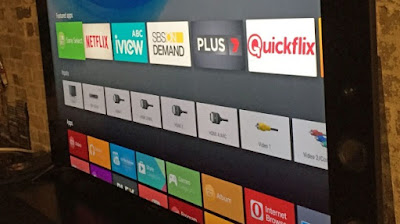
through the slick Android menus and you'll also find standard Smart TV
apps such as FreeviewPlus, Netflix (with Ultra HD support and an HDR
update on the way), Quickflix, iView, SBS, Plus7, Crackle, YouTube,
Pandora, TuneIn and others.
The television's new X1 processor
keeps everything smooth and responsive. You can also tap into a limited
range of games, with the option of connecting a PlayStation or
third-party controller.
There's a reasonable range of titles
catering to casual gamers, although it's hard to see people getting too
excited when these games are available on other devices. Serious gamers
will find a few titles to grab their attention, but I don't see why
you'd bother paying again for a limited copy of a game you already own
on another platform.
Unfortunately there's no support for PlayStation Now game streaming service in Australia, which is the feature serious gamers are likely looking for from a Sony device.
If
you want to use Android apps that aren't available for Android TV, the
television supports Chromecast streaming and screen mirroring. This
gives you the best of both worlds and might help overcome your
frustrations over the limited number of Android TV apps.
So what's the verdict?
Think
long and hard about what you want to do with Android on this television
and whether it's worth the expense if you won't find the apps on you
want in the app store.
In theory just about everything you can do in
Android TV on this television, apart from gaming with a PS controller,
you could do on your television using an Android smartphone or tablet
via screen mirroring.
The beauty of Android TV is that it cuts
down on your reliance on mobile devices for some tasks, particularly
when it comes to multimedia. Now you can just flop down on the couch
with the remote and watch your digital content the old-fashioned way.
If
this sounds appealing then Android TV might be for you. Even if you're
happy to drive your television from your phone or tablet, Android TV
might appeal to members of your household who aren't.


