Showing posts with label Windows 10. Show all posts

Aug 1, 2015

Windows 10 : Security


Windows 10 : Security


 Windows 10 arrived this week, touting improvements and new features for businesses. Security experts were cautiously optimistic about the new security enhancements, including improved access controls, data loss prevention features, and app whitelisting capabilities.

 "Some will have real value once the bugs are worked out, patched, and the industry provides Microsoft feedback," said Brad Passman, director of information technology at Novetta.

 Security experts welcomed overhauling Internet Explorer entirely and introducing Microsoft Edge, noting that attackers have increasingly been targeting the Web browser. Other new business-worthy features were Device Guard and Enterprise Data Protection.

Device Guard flips traditional antivirus on its head and introduces whitelisting to the operating system. Programs aren't allowed to run unless they are specifically determined to be safe, by checking the file's cryptographic signature. 

Device Guard relies on Microsoft's Hyper-V virtualization technology to store its whitelists in a shielded virtual machine. Even the system administrator can't access or tamper with these VMs. However, this is currently available only on Windows 10 Enterprise, and for systems capable of hardware CPU virtualization and I/O virtualization. Device Guard also relies on the on-board TPM chip and UEFI Secure Boot.


BitLocker has made it easier for businesses to turn on full-disk encryption, but until now, most businesses had to rely on third-party products to protect individual files.

Enterprise Data Protection in Windows 10 provides persistent file-level encryption and basic rights management to corporate files. EDP fully integrates with Azure Active Directory and Rights Management services, making it easier to control who has access to the file. EDP also provides the tools necessary to keep personal and business data separate in bring-your-own-device environments, Passman said.

An architectural change, Trusted Boot targets rootkit attacks, where malicious code attempts to tamper with Windows as it boots, before the antivirus and other system defenses kick in. Microsoft introduced features to protect the Windows kernel and privileged drivers in previous versions, but Trusted Boot enhances those measures to prevent system tampering.

Changes to the Network Required
Most of Windows 10's promising new features will require a heavy investment in the rest of Microsoft's ecosystem, Passman warned. Along with the expected learning curve, systems administrators will need to make some changes in their networks to support the new features. This may be a challenge for organizations that have adopted cloud infrastructures in Amazon Web Services and Google, he said.  

Businesses need to make sure they are running security software that supports Windows 10. Microsoft made major changes in its architecture, which affected how antivirus products would work in the new operating system.

 Even though several major antivirus companies have already announced their products have been updated, it's something businesses need to verify before starting the upgrade path. While Windows Defender would automatically enable protection if the operating system detects the third-party security software is not installed or is out of date, businesses should not rely exclusively on Windows Defender, Passman warned.

Many drivers and utilities may not yet have Windows 10 drivers, so businesses may find their systems crippled after upgrading. During the preview period, many testers reported problems with some Intel chipsets and Nvidia graphics drivers. In the case of some Lenovo ThinkPads, some of the utilities are disabled or just won't work with Windows 10 at this time, said Andy Hayter, a security evangelist at G DATA.

Biometrics Are Coming
Microsoft has supported third-party biometric logins for a long time, and a driver framework to make it easier for software to incorporate biometric hardware since Windows 7. Windows 10 integrates and extends biometric logins and two-factor authentication with Windows Hello. The biometrics data is stored in the on-board TPM chip, making it harder for attackers to steal the credentials.

This would be easy to turn on with new systems shipping with the required hardware, but for businesses upgrading existing systems, getting biometrics hardware such as fingerprint scanners, depth-sensing 3D cameras for facial-recognition, or a retina scanner, would be a challenge.

While fingerprint scanners are on the market, Intel is one of the few makers with the type of 3D camera needed, and retina scanners are not widely available as of yet. While Windows Hello is available in every version of Windows, this wouldn't be of use to most businesses until the special hardware comes to market.

Microsoft has promised manufacturers are working on a slew of Windows 10-ready authentication hardware, but this is still a small segment.

"Like any major OS release, it's best to wait and evaluate before leaning too far forward to ensure business isn't interrupted," Passman said.

But No Sense in Wi-Fi Sense
 
Wi-Fi Sense lets Windows 10 users share Wi-Fi passwords with up to three categories of social media connections. This is group-based sharing, and there is no way to select specific individuals who get the passwords.

The connections can then share the information with others. Many social engineering and penetration test attempts try to get an individual to walk into the office and piggy back onto the network.

This feature actually makes it easier to fully compromise the network, as it lets unauthorized guests onto the network, gives them access to data, and gives visibility into network traffic, security experts said.

This "huge security hole" will be a bigger problem for personal users and small and mid-sized businesses, rather than large enterprises, which will likely disable Wi-Fi Sense by default, said Slawek Ligier, vice president of engineering content security at Barracuda Networks.

 Smaller businesses are typically more likely to use consumer-grade wireless access points and typically exercise less control over end-user equipment, Ligier said. If a compromised machine joins the network with a shared credential, its activities—such as distributing spam or malware—can get the business IP address blacklisted via IP Camera.


"SMBs are less likely to detect possible abuse of their network until their IP range becomes blacklisted. Once that happens, it can be very difficult and time consuming to get off, resulting in significant loss of business," Ligier said.

It's actually pretty easy to turn off Wi-Fi Sense, as the checkboxes are under Manage Wireless Settings, so businesses would be best served to just disable it outright, Hayter recommended. Businesses can also configure routers to only accept connections from trusted devices via MAC addresses, which would mitigate the risk posed by Wi-Fi Sense.
"There is a lot to like with Windows 10 from the security perspective. BUT…you must move cautiously into this world," Hayter said.


Cr.PC Mag,bangkok21st ,Synergy | Facebook


Jul 29, 2015

Windows 10 : More & More


Windows 10 : More & More

It has been a busy time in Redmond. Three hundred and two days ago, on September 30, 2014, Windows 10 was announced by Microsoft. The name, at the time, was a bit of a surprise, and Windows 10 was born out of the ashes of Windows 8.1. Over the last three hundred days, we have seen a pronounced change in how Microsoft develops software.

Windows 8 was the crowning achievement of Steven Sinofsky, and his sudden departure from the Redmond company only weeks after Windows 8 shipped perhaps signaled that Microsoft knew out of the gate that Windows 8 would be controversial and difficult to adopt for their core user group. A new direction was necessary.

And so we have Windows 10. Separated from Windows 8 by more than just a number, it was also forged by a Microsoft who was more open about the development process than I can ever recall. The day after Windows 10 was announced, Microsoft opened up the Windows Insider program, to give anyone who wanted a look at the new take on Windows to give it a spin, and not only that, they could offer feedback and suggestions for apps and features.

The changes made to Windows 10 over the last three hundred odd days, have been dramatic, which is a testament to how the new Microsoft takes and processes the huge amount of feedback it received.

Windows 10 : More & More
Windows 10 Start Menu and Desktop in October 2014

The Windows Insider program was very successful. Very quickly the number of people who had signed up was over a million, and the last count that I saw was that there are over five million people in the Windows Insider program. The response has certainly been enthusiastic.

Windows 10 : More & MoreWindows 10 Start Menu and Desktop at release

Of course it helps that the software being tested showed that Microsoft was listening well before the Insider Program even began. Windows 8’s biggest pain points, such as the Start Screen, full screen apps, and the Charms bar, were not going to be tweaked in this release, but completely done away with. Back was the Start Menu, back was windowed apps, and back was what made Windows, well, Windows. Where Windows 8 was promoted as touch-first, Windows 10 was created as productivity first, with the OS trying to assist you with things like Snap Assist rather than get in your way.

There is a lot of changes and features to go over, and in typical AnandTech style, we are going to provide as much information about each as we can. I wanted to ensure that we did the review with the final code, to ensure any of our tests would be accurate and real-world results. Hopefully the full review is worth the wait.

With Windows 10 being the first ever free upgrade, here is a quick look at what to expect if you signed up to get the upgrade on day one.

Windows 10 gains a personal assistant in Cortana. What originally launched on Windows Phone has been brought to the PC, and it can now work across all of your Windows devices. One of the key benefits of Windows 10 over Windows 8 is that features like Cortana are easily discoverable. Cortana now lives in a search box right beside the start button, and it can keep track of your travel plans, set up reminders, and perform searches for you.

Windows 10 : More & More

Microsoft is also adding a new browser to Windows 10, with Microsoft Edge. Although based on Internet Explorer under the hood, huge chunks of code have been taken out to improve security, and the rendering and scripting engines have been optimized to make Edge one of the fastest browsers around.

It adds support for new features like being able to markup web pages and share them, and Cortana is built in to provide contextual search results right in the page. It is a big step up from Internet Explorer in standards compliance, and while it’s not quite finished yet, Microsoft has promised to update it often through the Windows Store.

Windows 10 : More & More

With Windows 8, Microsoft basically built a tablet operating system, and stuck the desktop inside of it. I actually quite liked the design when using Windows 8 with touch, but using it on a large screen desktop could be frustrating. Windows 10 is still designed for both systems, but they have added Continuum to Windows 10 to automatically prompt to switch from one mode to the other.

Optimizing Windows for what you are doing is a much better approach than optimizing for what you’re not doing, and Continuum finally bridges the gap between desktop and tablet on one device.

Gaming is getting a big boost on Windows 10, with support for DirectX 12 which is the biggest change to their gaming APIs since DirectX 10 launched with Windows Vista way back in 2006. DirectX 12’s most important feature is likely its low-level API, which can provide much better performance in a lot of scenarios where developers had been CPU bound before.

Graphics Processing Units are massively parallel devices, but could be bottlenecked by the API being CPU bound. DirectX 12 makes some big changes to the API to give the developers the chance to get around these bottlenecks, and the upcoming DirectX 12 games can add a level of detail that was unattainable before.

Windows 10 : More & More

Gaming doesn’t stop there though. Windows 10 brings some other cool things to gaming on the PC. The built in Xbox app will support Game DVR, allowing you to record game sessions, edit them, and share them, all within the Xbox app. One of the coolest features coming is game streaming from an Xbox One to any Windows 10 PC, allowing you to use any PC or tablet as the display for the Xbox, as long as it is on the LAN.

 This isn’t new tech, but it will be built into every Windows 10 PC. Windows 10 is also going to offer cross-device gameplay, allowing you to play against people on Xbox One or Windows 10. Some games will even support starting a game on one device and finishing on the other.

Windows 10 : More & More

The built in apps have all gotten major overhauls with Windows 10, and now work a lot better on a desktop but equally well on a touch device. Photos has gone from an almost unusable application on Windows 8 to a very nicely executed app in Windows 10. Mail has seen a huge change, and has taken queues from their purchase of Acompli, which had one of the best email apps on iOS.

Maps has also gotten a big facelift, and it can sync information among all of your Windows devices. Xbox Music has been rebranded to Groove Music, and the movies app is now a movie player with the Windows Store being unified to include all purchases including movies and TV.

Windows 10 : More & More

On the security side, Windows 10 brings a lot of features here as well. One I am very much looking forward to is Windows Hello, which will allow you to log in with supported facial recognition hardware, or fingerprint readers. Once logged in, Passport will be available as a service to allow authentication to external services, if they add support.

This will leverage public-private key technology, so if a third party was able to obtain the database of passwords from a web service, they would just have your public key which is useless to them. I’ve said it before, and will say it again. Passwords have outlived their usefulness and any work to move this technology forward should be a huge benefit to everyone.

Windows 10 : More & More

And these features are really just the tip of the iceberg, with far more available including virtual desktops, drop shadows, a new dark theme, and more. Windows 10 is a big step up from Windows 8, but also from those that hung back on Windows 7. With the free upgrade from Windows 7 or 8 being offered for a year, adoption should be strong, but time will tell. I have been running Windows 10 since October, and as my daily computer since January. It has been worth the wait.

Cr.Anandtech ,ข้อมูลอัพเดท ,bangkok21st

Feb 2, 2015

Raspberry Pi 2 using Windows 10

The Raspberry Pi 2,do-it-your-selfers
The Raspberry Pi 2 computer : the size of a credit card and sells for $35 US.

Raspberry Pi 2 computer that will run Windows 10 on sale for $35

Upgraded chip fast enough to run desktop applications, professor says

Want to buy an ultra-cheap computer that will run Windows 10? The Raspberry Pi 2 — the new, more powerful version of the popular credit card-sized computer Raspberry Pi — is now on sale for the same price as the original, $35 US.

The original Raspberry Pi Model B was launched in 2012 by the Raspberry Pi Foundation, an educational charity based in the U.K. The goal was to get children more interested in programming by giving them a cheap, simple computer that they could experiment with.

The computer, which ran versions of the Linux operating system, sold out on launch and has been relatively popular among educators and do-it-yourself electronics enthusiasts in the "maker" community.

    Hear more about the Raspberry Pi on Spark

The Raspberry Pi 2 has double the memory and a processor six times more powerful than the original version, according to the Raspberry Pi Foundation.

"It's got enough horsepower to do some interesting stuff," said Chris Tyler, an industrial research chair at the Centre for Development of Open Technology at Seneca College in Toronto. "It would be a good foundation for a basic desktop machine."

Tyler said that wasn't the case for the original version, for which he wrote open source software packages. While the previous Raspberry Pi could run hardware such as 3D printers, it wasn't quite up to word processing or image editing. Tyler said he is currently making plans for software to support the Raspberry Pi 2.

Like its predecessor, the Raspberry Pi 2 comes as a single board, with no case, screen, or input devices, and will run versions of the Linux operating system.

But it will also run a free version of Windows 10, Microsoft announced in a post on website for developers. In a statement, Microsoft said the "maker" community — do-it-yourself enthusiasts who embraced the original Raspberry Pi — are "an amazing source of innovation for smart, connected devices … and we're excited to be part of this community."

    Microsoft shows off Windows 10, HoloLens, Cortana for PC

The company has not said when Windows 10, including the free version, will launch. But it said it would share more details in "coming months."

The original Raspberry Pi has sold millions of copies around the world, including Canada. Tyler said it's already used in some Toronto schools and others are making plans to use it.

According to Alex Lai, digital design technician at the Fort York Branch of the Toronto Public Library, as of this past summer, cases for the original Raspberry Pi were one of the most popular objects printed by library users with the library's 3D printers.

Both the original Model B and the cheaper Model A version will continue to be available, the Raspberry Pi Foundation said.

Cr.CBC News

Jan 21, 2015

Windows 10

 
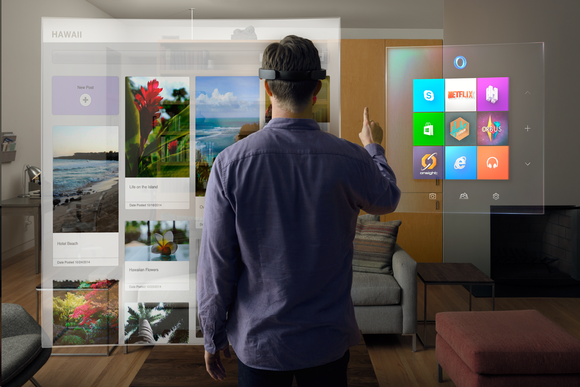
Windows Holographic ,  HoloLens headset.
Windows Holographic will build 3D imaging into Windows 10.


Windows 10's new features: Cortana, a 'Spartan' browser, Xbox streaming, and more


It’s official, folks: Windows 10 is coming to the people. After kicking off Windows 10 with a bevy of business-friendly features, Microsoft drew back the curtain on the operating system’s new consumer-focused features at an event on Wednesday, while simultaneously driving home a vision of an operating system designed to deliver a singular, cohesive experience across a myriad of device types.

And it'll be a free upgrade for Windows 7 and 8 users, who can snag the operating system for nada in the first year after Windows 10 hits the streets.


After Microsoft operating system chief Terry Myerson announced that crucial tidbit, Microsoft’s Joe Belfiore took the stage to run through some features coming to Windows 10 Preview that are designed to make using the operating system a smoother experience.

First, Belfiore showed off some helpful tweaks to Windows 10 features that have already been announced: The Start menu will be able to expand to fill the full screen if you desire, for one thing. The Action Center (read: Windows 10’s notification center) is receiving improved functionality, such as Windows Phone 8.1-esque quick action buttons that let you activate features (such as Bluetooth and Wi-Fi) with a single click. Notifications in the Action Center will be able to be expanded.

More helpfully for everyday workflow, Windows 10 will condense the Control Panel and the modern UI PC Settings into a single interface, eliminating Windows 8’s maddening insistence on dumping crucial system tools into two separate locations.

Microsoft also announced that its Continuum feature, which dynamically shifts the Windows 10 interface from the Modern UI to the desktop depending on whether you’re using a traditional PC or a touchscreen device, will soon appear in Windows 10 Preview builds.

Cortana comes to PCs

As anticipated, Microsoft’s Cortana digital assistant will make the jump from Windows Phone to Windows 10, assuming control of many of the operating system’s search features. Cortana, which will get her own place next to the Start button in the desktop taskbar, can perform many of the same basic tricks she does in Windows Phone. Cortana can be interacted with via text or natural voice queries, just like on mobile devices.

Still based off Microsoft’s cloud-based Bing brains, Cortana can answer basic queries like “Will I need a coat tomorrow?” or how much it costs to attend the University of Washington, as Belfiore showed in live demonstrations. But Cortana’s also been tweaked for more useful PC-like interactions. She can scour your local machine, OneDrive account, and even your business network to find files based on natural language queries. Belfiore showed off the capabilities by asking Cortana to “Find PowerPoint slides about the charity auction” and “Show me photos from December.” The digital assistant surfaced the desired information nearly instantly.

That sounds pretty darn handy, and there are more playful commands, too: Telling Cortana to “Play my music” launches the music app, while asking her to “Please be quiet” silences the music. Nice!

Windows 10 for phones and universal apps


Belfiore then veered off to show Windows 10 on phones and tablets, including a brief demo of mobile, touch-friendly Office apps. Windows 10 for phones will basically act like an extension of your PC, featuring universal Windows apps that share the same central heart and design as their PC counterparts, as well as newly universal notifications that synchronize across Windows 10 devices.

Windows 10 phones and small-screen tablets will include a free copy of Office. For a quick look at the universal Office apps, be sure to check out our article on Windows 10 for phones and tablets.

After the mobile talk, Belfiore showcased a rebuilt version of Outlook designed for PCs, tablets, and phones alike as a universal Windows app. Strongly resembling the Mail app in Windows 8—at least aesthetically—the universal Outlook map will sport a unified look across device types, packing touch-friendly commands such as swiping left on a message to remove it, or swiping right to flag it for later follow up.

Since many of Microsoft’s apps—including Outlook—have their heads in the cloud, changes you make to a universal app on one device will be immediately reflected on other devices, as Belfiore demoed by actively editing Calendar app entries simultaneously on a PC and a phone.

Microsoft’s bringing the same cloud-centric, universal app experiences to its core Windows apps as well, all powered by OneDrive on the backend. The Photos app will create albums from all your devices, intelligently removing duplicates and burst photos. A revamped universal People app will collate your contacts, while the Music app is also receiving a universal overhaul. As rumored, Microsoft will add support for you to put your music collection in OneDrive within the next month or two, so you can listen to your tunes anywhere. Maps will also be receiving Cortana integration, and she'll be able to remember where you parked your car.

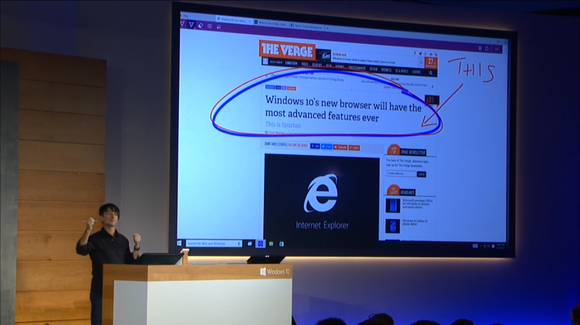
Spartan browser's annotation
The Spartan browser's annotation capabilities.

This is Spartan

Also new to Windows 10 is Spartan: A new, clean-looking, lightweight browser built around a new rendering engine. It won’t be available in the first Windows Insider builds, and it will only come to phones eventually, Belfiore said.

The Spartan browser includes a note-taking mode that lets you annotate a webpage, then share your marked-up, commented-on version with others using Windows 10’s native Share feature. There’s also a clipping tool so you can save portions of websites directly to OneNote.

Spartan also doubles down on the mere act of reading on the Internet. The browser integrates an updated version of the stellar Reading Mode found in Windows 8’s Metro Internet Explorer app. Reading Mode strips all the ads and sidebar crud out of webpages, formatting articles so that they appear similar to a book. It’s a wonderful thing. Spartan also taps into the Windows Reading List app, so you can save articles to read later, synchronizing the list across multiple devices. Unlike the Reading List app in Windows 8, the one in Windows 10 will let you save content to read offline.


Windows 10's new features
Windows 10's new features: Cortana, a 'Spartan' browser, Xbox streaming, and more


Cortana is also being integrated directly into Spartan. "Because she knows you, she can help in more nuanced ways,” Belfiore said, showing an example where searching for “Delta” in his address bar popped up information for the Delta flight Belfiore was scheduled to take later. Cortana will also pop up when you visit a restaurant’s website, surfacing directions as well as information about the restaurant’s menu, hours of operating, and Yelp reviews.


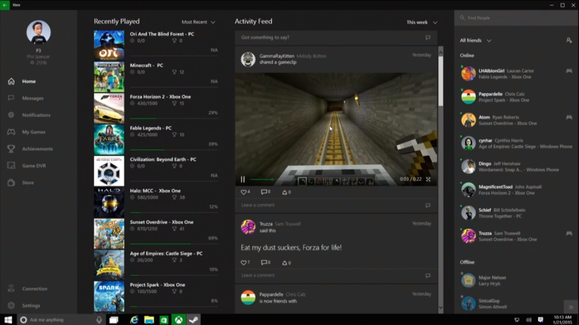
The Windows 10 Xbox Game
The Windows 10 Xbox app.


Improving PC games with Xbox

Microsoft’s also bolstering Windows 10’s gaming chops by deeply integrating Xbox capabilities into the operating system. A new Xbox app essentially looks like a more fully fleshed-out version of SmartGlass, letting you chat with your Xbox Live pals, view your achievement information, or access game DVR clips. The app also lets you like, share, and comment on game clips.

But Windows 10’s new gaming chops is about more than merely expanding Xbox’s footprint. While you’re playing traditional PC games, be it in Steam or otherwise, a new Windows key + G keyboard shortcut brings up an interface for saving snapshots and 30 second video clips of your adventures, which then brings you into the Xbox app to share it. Games don’t directly have to support the functionality as it’s being overlaid directly by Microsoft in Windows 10.

As previously announced, the performance-enhancing DirectX 12 gaming API is also coming to Windows 10. Xbox head Phil Spencer claims that the API can deliver up to a 50 percent performance improvement in games.

Microsoft also wants to enable more gaming experiences regardless of the device you’re using. Fable Legends players on Windows 10 and Xbox One will be able to play with each other, and you’ll be able to stream your Xbox One games directly to any Windows 10 device, though it sounds like it will be limited to local networks only, similarly to Steam in-home streaming.


Surface Hub, Holographic
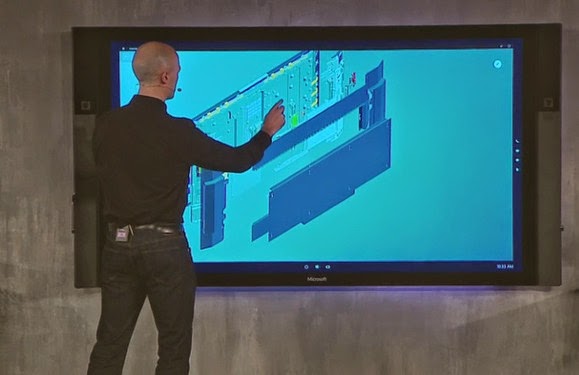
The Surface Hub.

Surface hub and Windows Holographic

This has nothing to do with Windows, but it's a major—and unexpected—hardware announcement from Microsoft: The company's rolling out the Surface Hub, an 84-inch, 4K, touch-enabled display for office collaboration.
And the Surface Hub isn't even the craziest hardware announced by Microsoft today. That honor goes to Windows Holographic, a set of technologies—a headset, new Windows 10 technology, and a HoloStudio dev app—that brings some insanely intense augmented reality capabilities to Windows.

When can you get it?


Myerson also revealed some stats from the Windows 10 Technical Preview. Thus far, more than 1.7 million people have registered for the Windows Insider program, and they’ve installed Windows 10 on more than 3 million different PCs.

A fresh Windows 10 Preview build containing the newly announced features will hit PCs next week, with a Windows 10 build for phones becoming available after the Super Bowl.

Cr.PC World